Background
One of my many hobbies is maintaining a homelab. A homelab can be thought of as a self-contained computing environment set up at home, used for self-hosting services, learning infrastructure, and experimenting. My personal homelab currently consists of a humble single PC that hosts Plex, Immich, Home Assistant, Syncthing, Radicale, and many more useful tools. It allows me to own my data, and replaces a lot of my subscription services.
Despite spending my working days building distributed highly available systems (currently at Amazon Web Services), I have a desire to introduce high availability to this homelab. Perhaps some of my work has bled into my personal life, or perhaps my Plex server has reached the critical mass of usage among friends and family that will complain to me if goes down. In either case, I want to introduce some more fault-tolerance into my homelab, and I can mentally justify that added expense and time as professional development. That’s a good enough reason for me!
Because of the technical complexity involved in this endeavor, this journey will be broken down into multiple pieces. This post represents part 1 of the process: the design.
Constraints & Criteria
Whenever one begins a technical project involving some level of ambiguity, outlining constraints and criteria should be the initial starting point. Within these requirements, a solution can then be developed.
The constraints are generally tied to my current living situation: a small one bedroom Toronto condo, already packed to the gills with equipment related to various hobbies. This system will therefore need to be as physically condensed as possible — no full size network rack allowed here. Ideally it would be able to fit in a 10U half-width rack footprint, since that’s how much open room I have on my shelf. In addition, I really care about the environment, so despite having effectively free energy in the form of the static condo fees that are included in my rent, I want this cluster to be energy efficient. I don’t have a quantitative threshold for this goal, but will be biased towards lower energy options when making design choices. This also lends itself nicely to my final constraint: it needs to be silent. No loud fans when the cluster will live within a couple meters of my bed! Luckily a modern energy efficient system should inherently be thermally efficient, as wasted energy in the form of heat is minimized.
My general criteria is somewhat outlined in the intro: a highly available homelab. This can be more concretely specified as a cluster of servers that can maintain high availability. That is, if a single node is shutdown or experiences failure, the other nodes in the cluster can automatically pick up and resume its work. In addition, the cluster should be fully configured by NixOS, like the other personal computers I use. This will also make migration of my existing server easy — I can simply refactor its existing NixOS configuration.
The Hardware
Three nodes is generally the lower limit for a distributed system, since an odd number of nodes is required for establishing quorum. Following the lower limit will also help make the small footprint constraint easier to fulfill, while still providing adequate fault tolerance for a homelab.
With the size of the cluster in mind, I began my search for a trio of mini PCs. I wanted nodes that had the following:
- a power efficient CPU with integrated graphics for hardware video decoding
- plenty of networking for both communication to my LAN (where high speed connections are desired) as well as cross node cluster communication for health checks, where a dedicated network will provide the low latency interference-free requirements that consensus algorithms demand
- a PCIe slot for connecting hard drives to, via a power efficient HBA
Those are a lot of demands for a small computer! Luckily, the MS-01 from Minisforum ended up fitting the bill. They contain laptop CPUs (read: energy efficient) with integrated graphics, a PCIe slot, and plenty of networking — 2x 10 GbE SFP+ ports and 2x 2.5 GbE RJ45 ports. I was also interested in the 2 USB 4 ports, as they could provide a cross node mesh network capable of a theoretical 20 Gbps, which I might dedicate to my storage layer.
After checking the measurements of the mini PCs, I realized that all 3 could fit in a half-width network rack in about 4U of space. This meant that if I could find an appropriately sized switch, patch panel, and enclosure for the HDDs, I could feasibly have my whole homelab on an 8U half-width rack. This, combined with an appropriately sized external UPS, would meet my size requirement. I ended up finding a switch on Aliexpress that could be stripped down to fit in a 1U space, with 4 SFP+ ports (one for each of the 3 nodes plus my desktop), and 16 1GB RJ45 ports. For the HDDs I found an STL for a hot-swappable 2U half-width 6 drive JBOD on Printables.
The Software
NixOS
While the specifics of NixOS are out of scope for this blog post, the uninitiated can consider it a tool to declaratively define a computer through configuration files, with primitives for things like installing packages, and creating and managing systemd services, directories, and files. Modules are then built (for personal use or shared through the community) on top of those primitives, abstracting away some configuration complexity, and allowing a user to configure a service for their machine using the high level options provided by the service’s module. Because the cluster will consist of multiple nodes, with each node running an identical configuration (well, near identical, a small subset of settings will differ, such as IP and hostname), this configuration can be written once and deployed to each node, respecting the DRY principle and minimizing setup time. In addition to the configuration benefits, NixOS allows a configuration to be rolled back to a previous generation, which can be used to recover from regressions introduced by future deployments.
Distributed Compute
Containers vs MicroVMs
Microvms are minimal and more efficient than typical virtual machines, as they omit as much hardware emulation as possible, leveraging virtio drivers to interface directly with their hypervisor. A Nix-based tool, microvm-nix, exists to allow easy generation of microvms through NixOS. This was a compelling option to migrate my existing services with minimal changes required, beyond specifying the resources needed for a given service to function.
While virtual machines provide stronger security than containers (which share the host’s kernel), containers are much lighter than virtual machines, even when considering microvms. I am comfortable with that tradeoff, given that all of my services — sans Plex — are only accessed through a mesh VPN and are not open to the wider internet.
While containers can also be declared through Nix, they would require some additional migration effort for my existing services, as NixOS heavily leans on systemd for service lifecycle management. Systemd doesn’t play nicely with containers as both it and the container runtime want to manage control groups within the container. Thankfully, a service abstraction layer was recently merged into NixOS. This means that I can convert my existing service configs into containers by refactoring their upstream module to be modular, and then leverage a tool like Nimi to replace systemd as PID 1. This is still considered a greater effort than the microvm route, but better aligns with my power efficiency goals, making containers the better choice for me.
Cluster Workload Orchestrators
My initial thought was to use Nomad, a workload orchestrator capable of clustering. It is the least resource demanding option I was able to find after some research, and had an existing NixOS module I could use. Despite deciding to pursue the container route, I wanted to experiment with Nomad, so I created a nomad cluster + microvm POC that I was happy with, choosing microvms for the POC as they required minimal configuration changes. Nomad was enjoyable to use, and lightweight as promised, but I was hoping to learn an orchestrator that had a bit more industry relevance.
Another option I considered was Proxmox, which some enthusiasts recently ported to run in NixOS. Unfortunately, this option was heavier than Nomad, and (at the time of writing) was restricted in its declarative configurability, primarily relying on configuration through the Proxmox web interface.
The final option I looked into was Kubernetes, the industry standard for container orchestration. Kubernetes itself has a lot of overhead, due to being designed for large-scale production clusters, with a dedicated control plane. I really wanted to learn how to work with Kubernetes, but my power efficiency constraint wouldn’t allow for it. Fortunately, I found K3s, which I ended up choosing as my workload orchestrator. K3s is a lightweight Kubernetes distribution optimized for resource-constrained environments, and has an existing NixOS module, meaning it will be easy to configure!
Distributed Filesystem
Storage is an important consideration as well. In a cluster, any service could failover to any node, so each container’s persistent state needs to be available to all of the nodes in the cluster through a shared storage layer. While many networks separate compute and storage, I will be opting for a hyperconverged infrastructure, meaning that the same physical cluster will be responsible for both. Adding a single NAS could be an alternative option, but would result in introducing a single point of failure, and risk violating the narrow size constraints of my homelab.
An important choice for storage is redundancy. Since my cluster consists of only 3 nodes, I decided to opt for one node of failure tolerance. This allows the cluster to survive the loss of a single node at the cost of 33% of its total storage capacity. While 2 nodes of redundancy would have provided more resilience — allowing a single node keep the storage layer operational — losing 66% of the available capacity was too high of a price to pay. Furthermore, requiring more drives for the same usable storage linearly increases energy consumption, also making this decision driven by my power efficiency constraints.
My options for a distributed filesystem ended up somewhat mirroring my search for a cluster workload orchestrator: I had to choose between the heavier industry standard, and a lightweight but niche alternative.
Ceph is arguably the standard distributed filesystem of choice. It is optimized for large-scale production clusters, and focuses on scaling, which it does very well thanks to offloading the calculations of a given file’s location to the client-side via its CRUSH algorithm. Integration with the Kubernetes cluster would also be simple, thanks to the Rook storage orchestrator, which abstracts away a lot of deployment complexity and automates the lifecycle management of the storage nodes. Unfortunately, beyond having a heavy footprint, Ceph’s daemons are continuously communicating, meaning that the nodes will be prevented from idling and dropping to more power-efficient C-states.
Put off by the resource footprint of Ceph, I looked for an alternative choice, focusing on lightweight options. Longhorn proved to be the most compelling alternative. Similar to Rook-Ceph in that it is built specifically for Kubernetes, it delegates as much of its disk management to the Linux Kernel as possible, as opposed to implementing its own management layer like Ceph. This results in a much leaner solution, with the caveat of poorer scalability, minimized in my case as my cluster has a mere three nodes.
Despite being tempted to follow the pattern of choosing the industry standard, I decided that the tradeoffs were not worth it, and chose Longhorn as my distributed filesystem of choice.
Conclusion
This endeavour really reinforced the added complexity that high availability demands. While I tried to scope this blog post to the design phase of the homelab, I couldn’t help but design and print mounts for the hardware to fit in the rack. After this was done, and all the hardware was mounted, I was left with a pretty nice result!
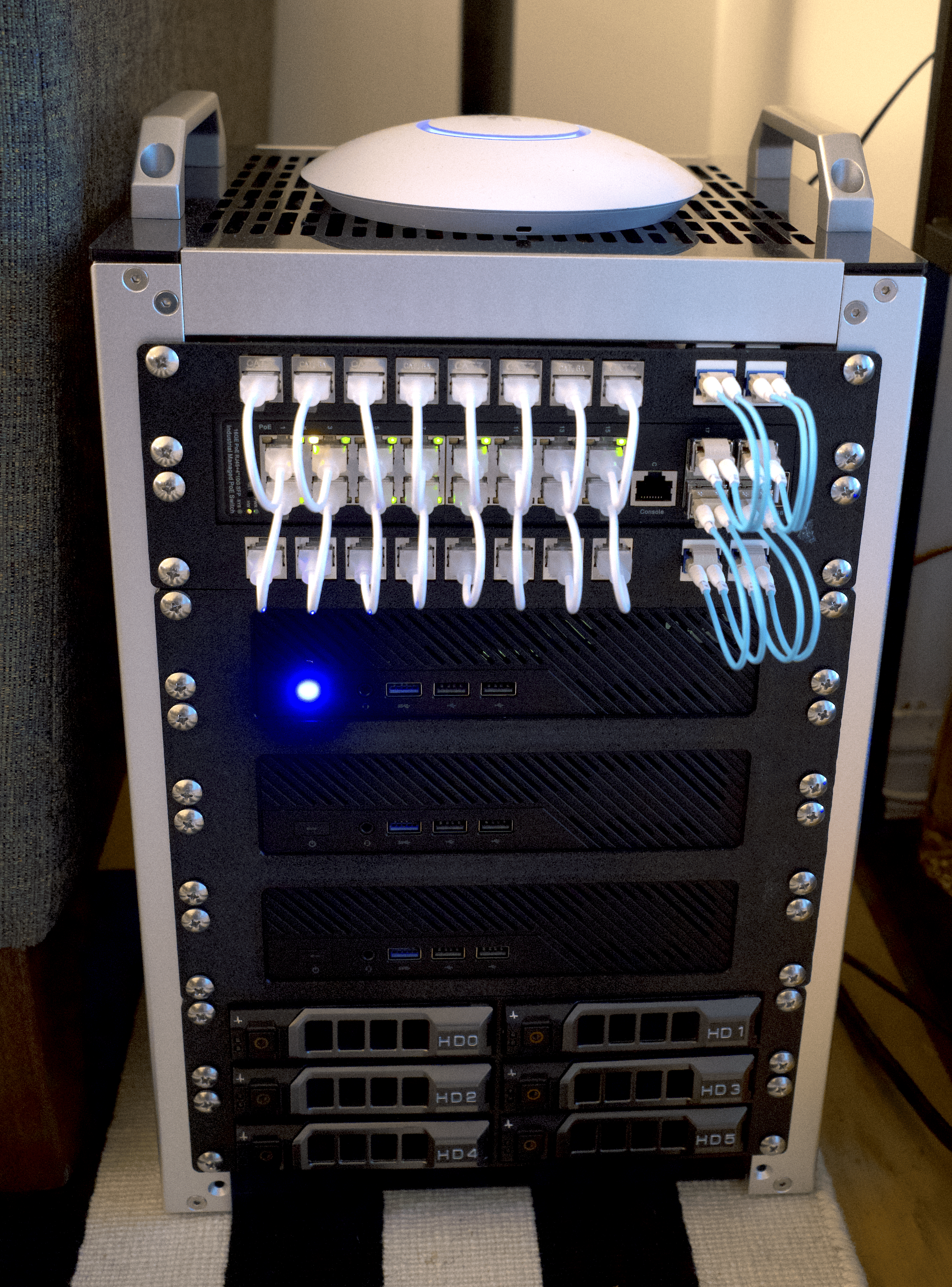
I’ve made these STL files publicly available on Printables with a Creative Commons license, in case you’d like to replicate my setup:
I hope you enjoyed my overview! I’m looking forward to the implementation phase of this project, where I’ll focus a bit more on the configuration process.